
目录
- 一、IO
- 1.IO的特点
- 2.基于IO的java网络程序
- 二、NIO
- 1.NIO的简介
- 2.基于NIO的java程序
- 三、Netty
- 1.netty介绍
- 2.基于Netty的java网络程序
- 四、总结
- 参考资料
一、IO
1.IO的特点
1.服务端阻塞点
server.accept();获取套接字的时候
inputStream.read(bytes);输入流读取数据的时候
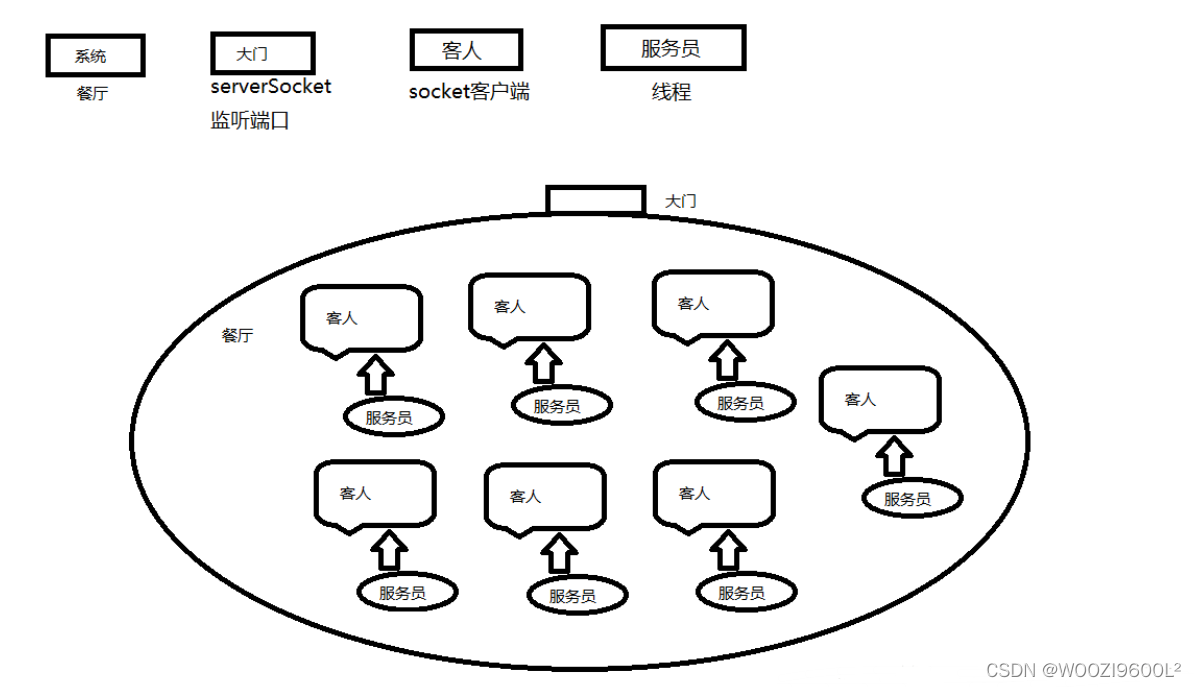
2.传统socket是短连接,可以做短连接服务器,他无法做长连接,属于一问一答的模式,比如老的tomcat底层用的就是socket,用完就会关掉线程,因此不会出现线程一直被占用的情况,支持处理多个客户端连接
(1)单线程情况下只能有一个客户端(一个线程维护一个连接,也就是一个socket客户连接)线程一直被占用。
(2)用线程池可以有多个客户端连接,但是非常消耗性能(用此案城池,就是老tomcat原理,只不过是用完后就释放)
原理流程图:
2.基于IO的java网络程序
使用IDEA新建2个java程序:一个作为服务器,另一个作为客户端:
client:
import java.io.IOException;
import java.io.OutputStream;
import java.net.Socket;

public class client {
    public static void main(String[] args) throws IOException{
        //创建客户端的Socket对象
        Socket s=new Socket("192.168.0.178", 50000);//一个可用的地址(server端的)

        //获取输出流,写数据
        OutputStream os=s.getOutputStream();
        os.write("hello,物联网2019级WOOZI".getBytes());

        //释放资源
        s.close();
    }
}
server:
import java.io.IOException;
import java.io.InputStream;
import java.net.ServerSocket;
import java.net.Socket;

public class sever {
    public static void main(String[] args) throws IOException {
        //创建客户端的Socket对象(SevereSocket)
        //ServerSocket (int port)创建绑定到指定端口的服务器套接字
        ServerSocket ss=new ServerSocket(50000);

        //Socket accept()侦听要连接到此套接字并接受他
        Socket s=ss.accept();

        //获取输入流,读数据,并把数据显示在控制台
        InputStream is=s.getInputStream();
        byte[] bys=new byte[1024];
        int len=is.read(bys);
        String data=new String(bys,0,len);
        System.out.println("接收的数据:"+data);

        //释放资源
        s.close();
        ss.close();
    }

}
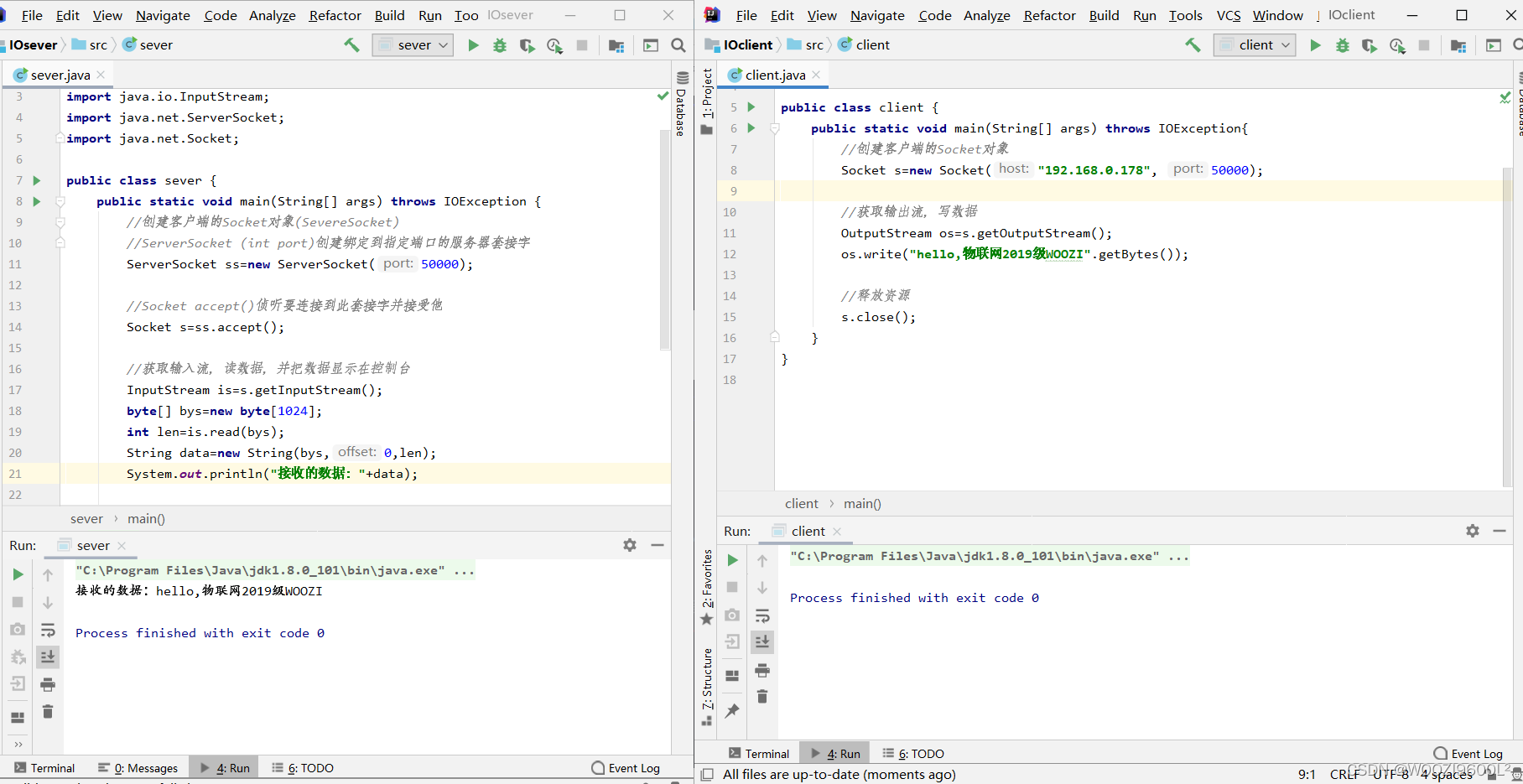
结果:
二、NIO
1.NIO的简介
主要API介绍:
ServerSocketChannel对应传统IO中的ServerSocket。
SocketChannel对应传统IO中的Socket。
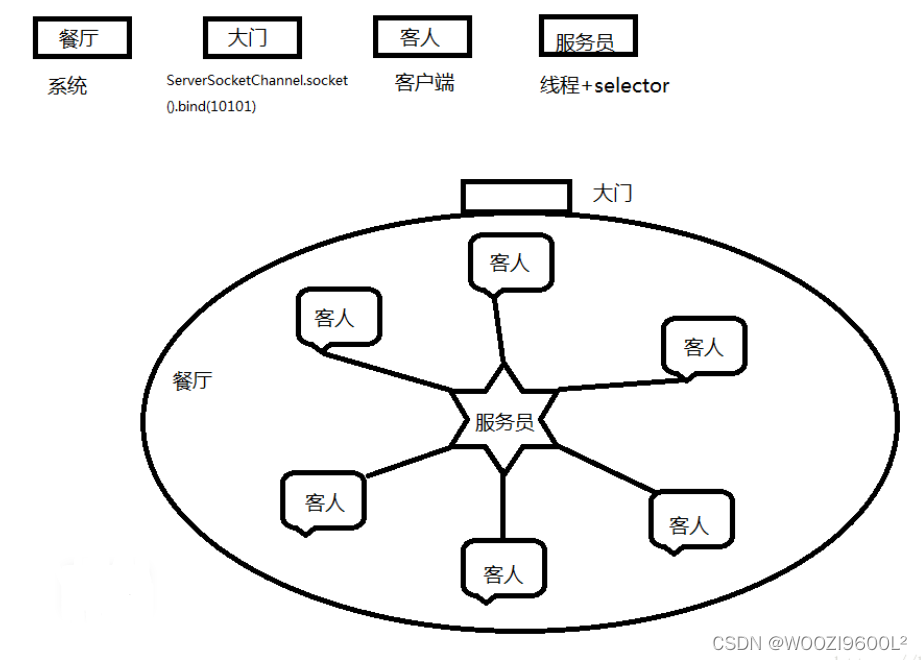
Selector 是NIO核心 ,负载监听 ServerSocketChannel与SocketChannel ,支持单线程连多个客户端;类似通道管理器而且底层是c实现的;线程拥有一个selector就可以支持多个客户端。
SelectionKey 相当于map中的key 相当于记录根据不同动作做不同事情,一个key一个事件。
原理流程图:
NIO的通信步骤:
①创建ServerSocketChannel,为其配置非阻塞模式。
②绑定监听,配置TCP参数,录入backlog大小等。
③创建一个独立的IO线程,用于轮询多路复用器Selector。
④创建Selector,将之前创建的ServerSocketChannel注册到Selector上,并设置监听标识位SelectionKey.OP_ACCEPT。
⑤启动IO线程,在循环体中执行Selector.select()方法,轮询就绪的通道。
⑥当轮询到处于就绪状态的通道时,需要进行操作位判断,如果是ACCEPT状态,说明是新的客户端接入,则调用accept方法接收新的客户端。
⑦设置新接入客户端的一些参数,如非阻塞,并将其继续注册到Selector上,设置监听标识位等。
⑧如果轮询的通道标识位是READ,则进行读取,构造Buffer对象等。
⑨更细节的问题还有数据没发送完成继续发送的问题…
2.基于NIO的java程序
使用IDEA新建2个java程序:一个作为服务器,另一个作为客户端:
client:
import java.net.InetSocketAddress;
import java.nio.ByteBuffer;
import java.nio.channels.SelectionKey;
import java.nio.channels.Selector;
import java.nio.channels.ServerSocketChannel;
import java.nio.channels.SocketChannel;
import java.util.Iterator;
import java.util.Set;

public class server {
    //网络通信IO操作,TCP协议,针对面向流的监听套接字的可选择通道(一般用于服务端)
    private ServerSocketChannel serverSocketChannel;
    private Selector selector;

    /*
     *开启服务端
     */
    public void start(Integer port) throws Exception {
        serverSocketChannel = ServerSocketChannel.open();
        selector = Selector.open();
        //绑定监听端口
        serverSocketChannel.socket().bind(new InetSocketAddress(port));
        //设置为非阻塞模式
        serverSocketChannel.configureBlocking(false);
        //注册到Selector上
        serverSocketChannel.register(selector, SelectionKey.OP_ACCEPT);
        startListener();
    }
    private void startListener() throws Exception {
        while (true) {
            // 如果客户端有请求select的方法返回值将不为零
            if (selector.select(1000) == 0) {
                System.out.println("当前没有任务!!!");
                continue;
            }
            // 如果有事件集合中就存在对应通道的key
            Set<SelectionKey> selectionKeys = selector.selectedKeys();
            Iterator<SelectionKey> iterator = selectionKeys.iterator();
            // 遍历所有的key找到其中事件类型为Accept的key
            while (iterator.hasNext()) {
                SelectionKey key = iterator.next();
                if (key.isAcceptable())
                    handleConnection();
                if (key.isReadable())
                    handleMsg(key);
                iterator.remove();
            }
        }
    }
    /**
     * 处理建立连接
     */
    private void handleConnection() throws Exception {
        SocketChannel socketChannel = serverSocketChannel.accept();
        socketChannel.configureBlocking(false);
        socketChannel.register(selector, SelectionKey.OP_READ, ByteBuffer.allocate(1024));
    }
    /*
     * 接收信息
     */
    private void handleMsg(SelectionKey key) throws Exception {
        SocketChannel channel = (SocketChannel) key.channel();
        ByteBuffer attachment = (ByteBuffer) key.attachment();
        channel.read(attachment);
        System.out.println("当前信息: " + new String(attachment.array()));
    }

    public static void main(String[] args) throws Exception {
        server myServer = new server();
        myServer.start(8881);
    }
}
server:
import java.net.InetSocketAddress;
import java.nio.ByteBuffer;
import java.nio.channels.SocketChannel;

public class client {
    public static void main(String[] args) throws Exception {
        SocketChannel socketChannel = SocketChannel.open();
        socketChannel.configureBlocking(false);

        // 连接服务器
        if (!socketChannel.connect(new InetSocketAddress("127.0.0.1", 8881))) {
            while (!socketChannel.finishConnect()) {
                System.out.println("connecting...");
            }
        }
        //发送数据
        String str = "hello,物联网2019级WOOZI";
        ByteBuffer byteBuffer = ByteBuffer.wrap(str.getBytes());
        socketChannel.write(byteBuffer);
        System.in.read();
    }

}
结果:

三、Netty
1.netty介绍
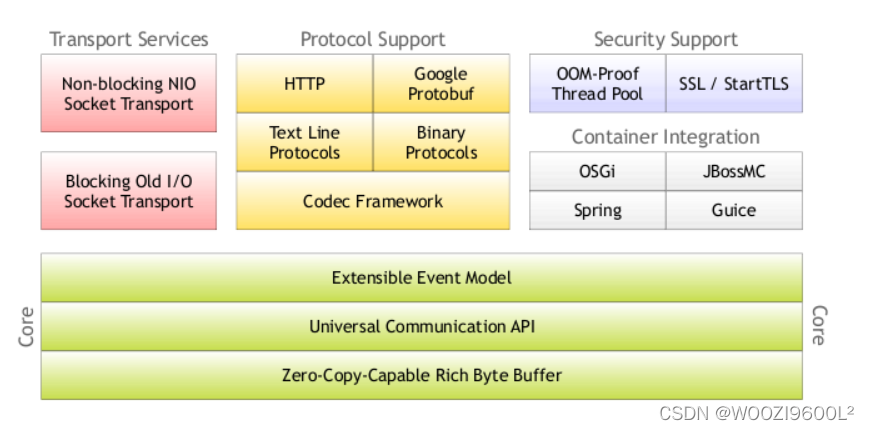
Netty是基于Java NIO client-server的网络应用框架,使用Netty可以快速开发网络应用,例如服务器和客户端协议。Netty提供了一种新的方式来开发网络应用程序,这种新的方式使它很容易使用和具有很强的扩展性。Netty的内部实现是很复杂的,但是Netty提供了简单易用的API从网络处理代码中解耦业务逻辑。Netty是完全基于NIO实现的,所以整个Netty都是异步的。
架构组成:
Netty通信的步骤:
①创建两个NIO线程组,一个专门用于网络事件处理(接受客户端的连接),另一个则进行网络通信的读写。
②创建一个ServerBootstrap对象,配置Netty的一系列参数,例如接受传出数据的缓存大小等。
③创建一个用于实际处理数据的类ChannelInitializer,进行初始化的准备工作,比如设置接受传出数据的字符集、格式以及实际处理数据的接口。
④绑定端口,执行同步阻塞方法等待服务器端启动即可。
2.基于Netty的java网络程序
使用IDEA新建2个java程序:一个作为服务器,另一个作为客户端,项目创建好之后要导入(两个都要,一样的操作),点击文件里的项目设置:


然后点击OK,会弹出一个框,也点OK:

将刚才添加的勾选上,点击OK即可:

client:
import io.netty.bootstrap.Bootstrap;
import io.netty.channel.*;
import io.netty.channel.nio.NioEventLoopGroup;
import io.netty.channel.socket.SocketChannel;
import io.netty.channel.socket.nio.NioSocketChannel;
import io.netty.handler.codec.string.StringDecoder;
import io.netty.handler.codec.string.StringEncoder;

/**
 *
 */
public class Click {
    private static final String HOST = "localhost";
    private static final int PORT= 15526;

    public static void main(String[] args){
        new Click().start(HOST, PORT);
    }

    public void start(String host, int port) {
        EventLoopGroup group = new NioEventLoopGroup();
        try {
            Bootstrap client = new Bootstrap().group(group).channel(NioSocketChannel.class)
                    .option(ChannelOption.TCP_NODELAY, true).handler(new ChannelInitializer<SocketChannel>() {
                        @Override
                        protected void initChannel(SocketChannel ch) throws Exception {
                            ch.pipeline()
                                    .addLast("decoder", new StringDecoder())
                                    .addLast("encoder", new StringEncoder())
                                    .addLast(new HelloWorldClientHandler());
                        }
                    });
            ChannelFuture future = client.connect(host, port).sync();
            future.channel().writeAndFlush("Hello Netty Server ,I am a netty client");
            future.channel().closeFuture().sync();
        } catch (Exception e) {
            e.printStackTrace();
        } finally {
            group.shutdownGracefully();

        }

    }

    public static class HelloWorldClientHandler extends ChannelInboundHandlerAdapter {
        @Override
        public void channelActive(ChannelHandlerContext ctx) throws Exception {
            System.out.println("HelloWorldClientHandler Active");
        }

        @Override
        public void channelRead(ChannelHandlerContext ctx, Object msg) throws Exception {
            System.out.println("HelloWorldClientHandler read Message:"+msg);
        }
    }
}
server:
import io.netty.bootstrap.ServerBootstrap;
import io.netty.channel.*;
import io.netty.channel.nio.NioEventLoopGroup;
import io.netty.channel.socket.SocketChannel;
import io.netty.channel.socket.nio.NioServerSocketChannel;
import io.netty.handler.codec.string.StringDecoder;
import io.netty.handler.codec.string.StringEncoder;

import java.net.InetSocketAddress;

/**
 *
 */
public class Server {

    private int port;

    public static void main(String[] args){
        new Server(15526).start();
    }

    public Server(int port) {
        this.port = port;
    }

    public void start() {
        /**
         * 创建两个EventLoopGroup,即两个线程池,boss线程池用于接收客户端的连接,
         * 一个线程监听一个端口,一般只会监听一个端口所以只需一个线程
         * work池用于处理网络连接数据读写或者后续的业务处理(可指定另外的线程处理业务,
         * work完成数据读写)
         */
        EventLoopGroup boss = new NioEventLoopGroup(1);
        EventLoopGroup work = new NioEventLoopGroup();
        try {
            /**
             * 实例化一个服务端启动类,
             * group()指定线程组
             * channel()指定用于接收客户端连接的类,对应java.nio.ServerSocketChannel
             * childHandler()设置编码解码及处理连接的类
             */
            ServerBootstrap server = new ServerBootstrap()
                    .group(boss, work).channel(NioServerSocketChannel.class)
                    .localAddress(new InetSocketAddress(port))
                    .option(ChannelOption.SO_BACKLOG, 128)
                    .childOption(ChannelOption.SO_KEEPALIVE, true)
                    .childHandler(new ChannelInitializer<SocketChannel>() {
                        @Override
                        protected void initChannel(SocketChannel ch) throws Exception {
                            ch.pipeline()
                                    .addLast("decoder", new StringDecoder())
                                    .addLast("encoder", new StringEncoder())
                                    .addLast(new HelloWorldServerHandler());
                        }
                    });
            //绑定端口
            ChannelFuture future = server.bind().sync();
            System.out.println("server started and listen " + port);
            future.channel().closeFuture().sync();
        } catch (Exception e) {
            e.printStackTrace();
        }finally {
            boss.shutdownGracefully();
            work.shutdownGracefully();
        }
    }

    public static class HelloWorldServerHandler extends ChannelInboundHandlerAdapter {

        @Override
        public void channelActive(ChannelHandlerContext ctx) throws Exception {
            System.out.println("HelloWorldServerHandler active");
        }

        @Override
        public void channelRead(ChannelHandlerContext ctx, Object msg) throws Exception {
            System.out.println("server channelRead..");
            System.out.println(ctx.channel().remoteAddress()+"->Server :"+ msg.toString());
            ctx.write("server write"+msg);
            ctx.flush();
        }
    }
}
结果:

四、总结
对比三种网络编程方式,netty的性能优于IO和NIO,netty是一个高性能、异步事件驱动的NIO框架,它提供了对TCP、UDP和文件传输的支持。
参考资料
(43条消息) Netty入门(一)——传统IO与NIO比较(一)_平凡之路无尽路的博客-CSDN博客_netty 比较
(43条消息) Netty——基本使用介绍_隔壁老王的专栏-CSDN博客_netty
(43条消息) 分别基于IO、NIO、Netty的Java网络程序_机智的橙子的博客-CSDN博客

