
Ruby's Adventrue游戏制作笔记(十一)Unity角色攻击——发射子弹
- 前言
- 一、编辑子弹
- 二、创建脚本
- 三、修改玩家攻击脚本
- 四、将子弹拖入玩家脚本
- 五、让子弹碰撞到该碰撞的东西
- 六、编辑子弹
- 七、增加修复(击杀)敌人函数
- 八、给发射添加动画
- 系列链接
前言
本文章是我学习Unity官方项目项目所做笔记,作为学习Unity的游戏笔记,在最后一章会发出源码,如果等不及可以直接看源码,里面也有很多注释相关,话不多说,让Ruby动起来!
游戏引擎:Unity2020.3
一、编辑子弹
将子弹拖入编辑器编辑
调整尺寸

使用刚体控制子弹
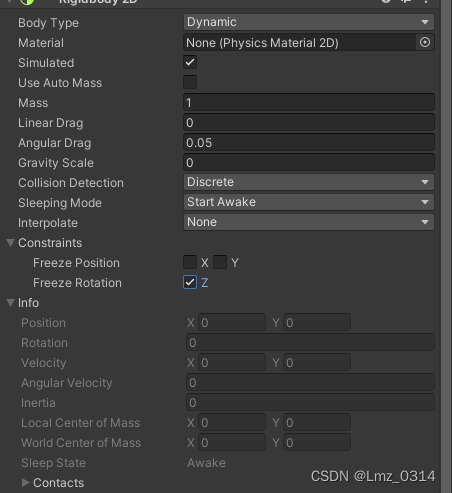
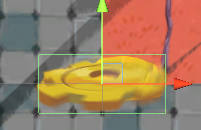
添加碰撞器,稍微调整一下碰撞范围
二、创建脚本
using System.Collections;
using System.Collections.Generic;
using UnityEngine;


// 控制子弹的移动
public class BulletController : MonoBehaviour
{
    // 获取刚体
    private Rigidbody2D rbody;


    void Start()
    {
        rbody = GetComponent<Rigidbody2D>();
    }


    void Update()
    {

    }

    // 控制子弹的移动
    public void Move(Vector2 moveDirection,float moveForce)
    {
        rbody.AddForce(moveDirection * moveForce);
    }
}
三、修改玩家攻击脚本
using System.Collections;
using System.Collections.Generic;
using UnityEngine;

public class PlayerController : MonoBehaviour
{

    // 玩家速度
    public float speed = 5f;

    // 玩家最大生命值
    private int maxHealth = 5;

    // 当前生命值
    private int currentHealth;

    // 受到伤害后的无敌时间 无敌时间2秒
    private float invincibleTime = 2f;

    // 无敌计时器
    private float invincibleTimer;

    // 是否无敌
    private bool isInvincible;

    // 玩家的朝向信息
    // 默认朝向右方
    private Vector2 lookDirection = new Vector2(1, 0);

    // 用于创建动画
    private Animator anim;

    // 子弹速度
    private int bulletSpeed;


    // 获得最大生命值
    public int myMaxHealth
    {
        get
        {
            return maxHealth;
        }
    }

    // 获得当前生命值
    public int myCurrentHealth
    {
        get
        {
            return currentHealth;
        }
    }

    // 获得玩家刚体
    private Rigidbody2D rbody;

    // 获取子弹,按下J键发射子弹
    public GameObject bulletPrefab;


    void Start()
    {
        currentHealth = 2;
        invincibleTimer = 0;
        // 获得玩家刚体
        rbody = GetComponent<Rigidbody2D>();
        anim = GetComponent<Animator>();
    }

    // Update is called once per frame
    void Update()
    {


        float moveX = Input.GetAxisRaw("Horizontal");  // 控制水平移动方向 按下A时返回 -1,按下D时返回 1
        float moveY = Input.GetAxisRaw("Vertical"); // 控制垂直方向 W:1 S:-1

        // 改变朝向信息
        Vector2 moveVerctor = new Vector2(moveX, moveY);
        if(moveVerctor.x !=0 || moveVerctor.y != 0)
        {
            lookDirection = moveVerctor;
        }

        // 设置动画
        anim.SetFloat("Look X", lookDirection.x);
        anim.SetFloat("Look Y", lookDirection.y);
        // 根据向量大小判断
        anim.SetFloat("Speed", moveVerctor.magnitude);

        // 创建position坐标,存储玩家输入的坐标
        Vector2 position = rbody.position;
        // position.x += moveX * speed * Time.deltaTime;
        // position.y += moveY * speed * Time.deltaTime;

        //使用向量尝试
        position += moveVerctor * speed * Time.deltaTime;

        // 将最终坐标赋值给玩家
       // transform.position = position;

        // 使用刚体
        rbody.position = position;

        // 无敌计时
        if (isInvincible)
        {
            invincibleTimer -= Time.deltaTime;
            if (invincibleTimer < 0)
            {
                // 倒计时结束后取消无敌状态
                isInvincible = false;
            }
        }

        // 按下J键进行攻击
        if (Input.GetKeyDown(KeyCode.J))
        {
            // 创建物体
            GameObject bullet = Instantiate(bulletPrefab, rbody.position + Vector2.up * 0.5f, Quaternion.identity);
            BulletController bc = bullet.GetComponent<BulletController>();
            if(bc != null)
            {

                bc.Move(lookDirection, bulletSpeed);
            }
        }

    }


    // 改变玩家生命值
    public void ChangeHealth(int amount)
    {
        // 如果受到伤害,判断是否无敌
        if(amount < 0)
        {
            // 无敌,不执行
            if (isInvincible == true) return;

            // 不无敌,执行,并且设定为无敌状态
            isInvincible = true;
            invincibleTimer = invincibleTime;

        }

        Debug.Log(currentHealth + "/" + maxHealth);
        // 把玩家的生命值约束在 0 和 最大值 之间

        currentHealth = Mathf.Clamp(currentHealth + amount, 0, maxHealth);


        //currentHealth += amount;
        Debug.Log(currentHealth + "/" + maxHealth);
    }
}
四、将子弹拖入玩家脚本
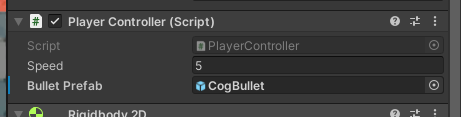
五、让子弹碰撞到该碰撞的东西
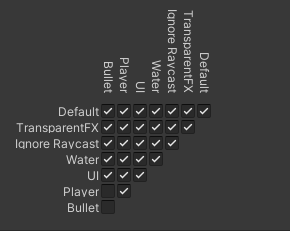
使用Layer进行管理
将玩家放在第8层,子弹设为第9层(层数随意,但是顺序不能变)

点击Edit-project Setting-physic 2D
设置子弹和玩家、子弹和子弹之间不能碰撞
六、编辑子弹
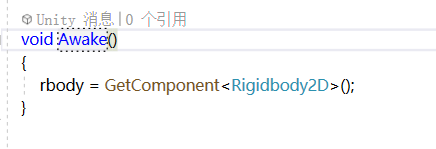
获得刚体,将子弹脚本中的Start函数中的获得刚体移动到Awake函数中
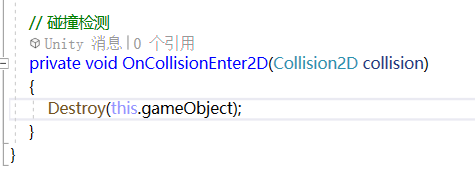
让子弹碰撞后消失
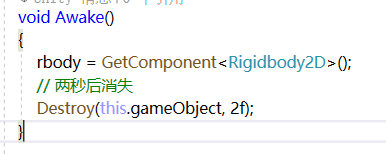
让子弹在飞一段时间后消失
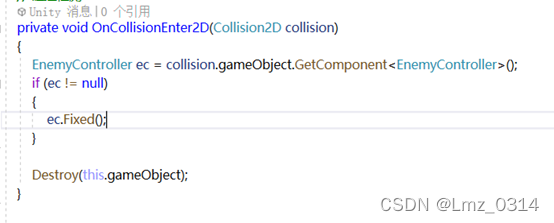
七、增加修复(击杀)敌人函数
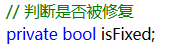
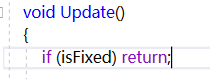
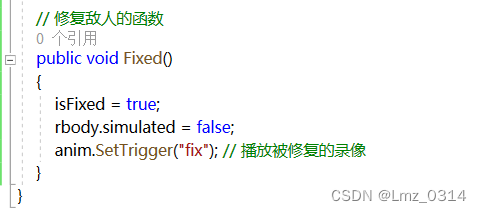
检测与敌人的碰撞
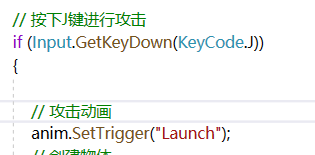
八、给发射添加动画
系列链接
还未编辑,发完后发链接。

